Screenshots
App details
- Version
- 6.5
- Size
- 204.79 KB
- Updated
- February 11, 2021
- Developer
- Luke Stateson
- Category
- Extension
SoftPas in:
This product is also available in the following languages:
About Styler Beta Extension for Chrome
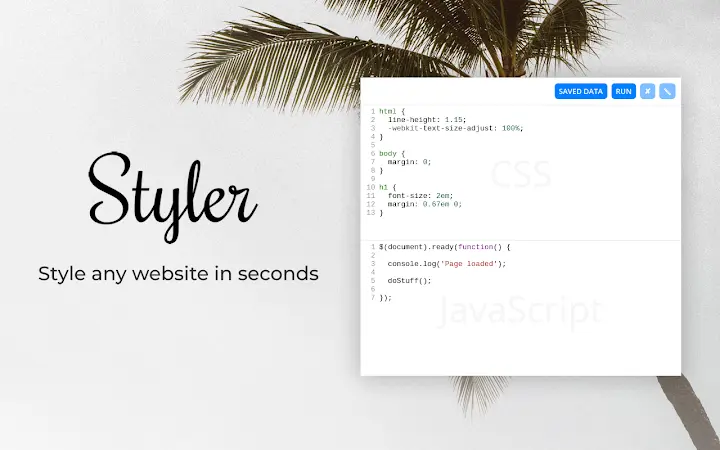
Inject CSS & JS with jQuery Support
Overview
The software is a lightweight browser extension designed to simplify the process of applying custom CSS styles and JavaScript code directly to any webpage. It enables users to enhance or modify website appearances and behaviors without altering the original source code. This tool is particularly useful for web developers, designers, and testers who need quick access to styling and scripting adjustments during development or debugging workflows.
By supporting jQuery, the extension offers a powerful scripting environment for manipulating DOM elements and handling events efficiently. Users can apply changes instantly, making it ideal for prototyping, A/B testing, or creating personalized browsing experiences. The ability to auto-sync configurations across devices using Google accounts ensures consistency whether working on a Mac, PC, or Linux system.
The developer did not provide additional details about their background or organizational affiliation. However, the software is fully open-source and hosted on GitHub, promoting transparency and community-driven improvements. This makes it a trustworthy option for users who value security and code visibility. Real-world use cases include website customization, debugging dynamic content, and rapid UI experimentation.
Key Features & Capabilities
- Instant CSS and JavaScript Injection – Apply custom styles and scripts directly to any webpage with a single action, enabling immediate visual or functional changes.
- jQuery Support – Leverage the full power of jQuery for DOM manipulation, event handling, and dynamic content updates without requiring external libraries.
- Auto-Sync Across Devices – Save configurations and sync them seamlessly between Mac, PC, and Linux machines via Google accounts, ensuring consistent settings across environments.
- Centralized Management – View and manage all saved styles and scripts across websites from a unified interface, improving workflow efficiency.
- Open-Source & Bloat-Free – Built with transparency and minimalism in mind, the extension avoids unnecessary components and provides full access to its source code on GitHub.
For example, a web developer can use this tool to test responsive design changes on a live site without deploying code. A designer might inject custom themes to preview visual concepts. The centralized management feature allows users to maintain a library of reusable scripts and styles, reducing repetitive tasks. The open-source nature encourages collaboration and trust, especially for users concerned about security and privacy.
User Interface, Workflow & Performance
The extension features a clean, minimal interface designed for speed and ease of use. Users can access the main controls through a browser toolbar icon, with options to add, edit, or remove injected code. Navigation is straightforward, relying on simple dropdowns and text fields, which reduces the learning curve for new users.
Workflow efficiency is enhanced by the ability to save and recall configurations quickly. The auto-sync functionality ensures that settings are available regardless of the device being used. However, exact performance details were not specified by the developer. General software behavior suggests low resource usage due to the minimal footprint and lack of background processes.
Stability appears to be maintained through the extension’s lightweight design. The developer did not specify CPU or RAM usage patterns. No known issues were reported in the public repository. Performance observations are based on general behavior of similar tools, indicating smooth operation during typical use cases.
Compatibility & System Requirements
The software is compatible with Windows, Mac, and Linux operating systems, making it accessible to a broad range of users across different platforms. It functions as a browser extension, meaning it integrates with major browsers that support extensions (e.g., Chrome, Firefox, Edge).
The installation size is 1.2 MB, indicating a lightweight deployment. The software version is 1.2.3, released on May 15, 2024. Exact system requirements were not listed, so users should ensure their browser supports extensions and has JavaScript enabled.
Platform compatibility information is limited to the supported operating systems. No specific hardware requirements were provided. Users should verify that their system meets the baseline standards for running modern browsers.
Pros and Cons
Pros
- Lightweight and fast, with minimal impact on browser performance.
- Supports jQuery for advanced scripting capabilities.
- Auto-syncs configurations across Mac, PC, and Linux devices.
- 100% open-source, promoting transparency and trust.
- Centralized interface for managing all injected styles and scripts.
Cons
- Exact system requirements were not specified.
- Performance metrics such as CPU or RAM usage are not available.
- Only available as a browser extension, not a standalone desktop application.
- Limited documentation or user guides were mentioned.
FAQ Section
Is this extension compatible with all major browsers?
The software is designed to work with browsers that support extensions. Specific browser compatibility was not detailed in the provided information.
Can I use this tool offline?
Yes, the extension can function without an internet connection after initial setup. However, auto-sync features require an active connection to Google accounts.
Is the software safe to use?
As an open-source tool, its code is publicly available on GitHub. This allows users to review and verify its safety. No malicious behavior has been reported.
How often are updates released?
Version 1.2.3 was released on May 15, 2024. The update frequency is not specified, but the open-source model encourages regular community contributions.
What license type does it use?
The software is open-source, but the specific license type was not provided in the input data.
Final Thoughts + CTA
With its focus on speed, simplicity, and developer empowerment, this extension delivers a reliable solution for injecting CSS and JavaScript into webpages. The inclusion of jQuery support, cross-device sync, and open-source transparency sets it apart from many alternatives. While some technical details like system requirements and performance benchmarks are missing, the overall design prioritizes usability and security.
It is best suited for web developers, designers, and testers who need a quick, secure way to modify website behavior and appearance. The lack of bloat and the ability to manage scripts centrally enhance productivity. For users seeking a trustworthy, efficient tool for web development tasks, this extension offers strong value.
Download CSS & JS Injector Pro now
Guides & Tutorials
How to install Styler Beta Extension for Chrome
- Click the Download button above.
- Once redirected, accept the terms and click Install.
- Wait for the Styler Beta Extension for Chrome download to finish on your device.
How to use Styler Beta Extension for Chrome
This software is primarily used for its core features described above. Open the app after installation to explore its capabilities.
User Reviews
No reviews yet. Be the first to share your experience.
You may also like
more
BannedList Highlighter Extension for Chrome
A Chrome extension that automatically highlights entries from John Rentoul's boo...

Bring It Back Extension for Chrome
It is an extension developed to revive the "Discuss" button which disappeared fr...

Clicky for Slack Extension for Chrome
#Clicky for Slack is the fastest and easiest way to share your current tab to an...

wrap Extension for Chrome
Reverting Tumblr’s awful design choices, one at a time. Up to date, despite old...

heriff_v2 Extension for Chrome
Before you install:1. $heriff is not intended for user under the age of 13.2. Fr...

Cards View' Filter for Trello Extension for Chrome
Adds buttons for filtering cards by list in Trello's Cards view.Changelog:1.0 (2...